Skip to content
phynite-lab

Materials research.
One workspace.

A workspace for materials scientists and research labs. Build crystal structures, run DFT and molecular dynamics, and compose figures from your numerical data.

The workspace

Three connected Labs support the work behind a paper: preparing models, running and inspecting simulations, comparing results, and presenting the numerical evidence.

DFT Lab

Quantum ESPRESSO

Investigate material properties through first-principles studies.

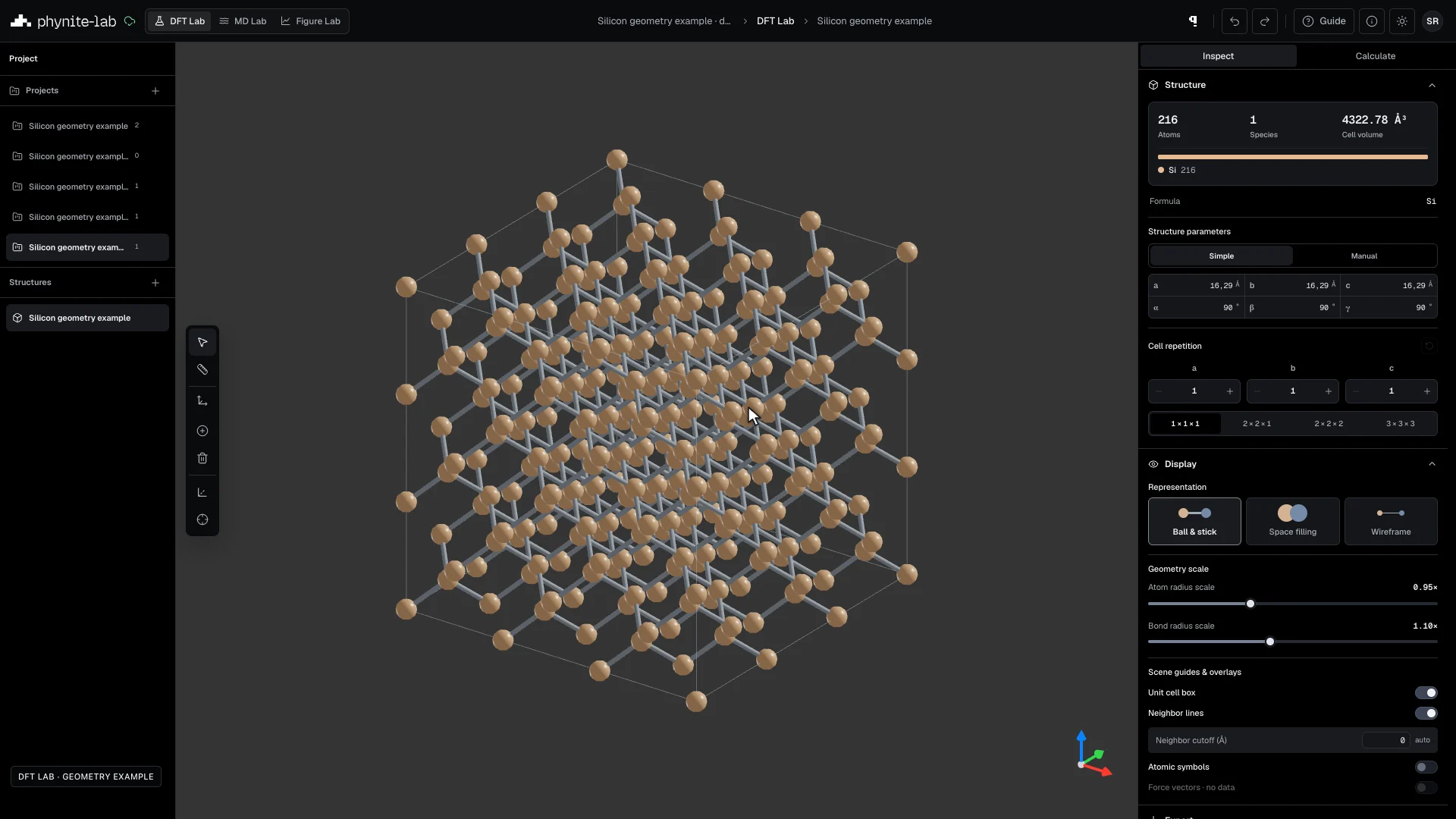
Build and compare crystal models, relax their geometry, and investigate electronic structure, lattice dynamics and thermoelectric transport. Design parameter and convergence studies, inspect executed inputs and solver logs, then take numerical results into Figure Lab for the comparisons and figures in your paper.

  • Energy & relaxation
  • Band structure & DOS
  • Phonons & thermoelectric transport
Read the DFT Lab guide

MD Lab

LAMMPS

Investigate thermal evolution, deformation and defects at the atomic scale.

Design LAMMPS studies around temperature, pressure and strain using Guided workflows or LAMMPS inputs you control. Follow structural changes through trajectories and quantify local order, pair correlations and dislocations with browser tools and connected-computer analysis. Export numerical results and selected structures for further analysis and reporting.

  • Guided & LAMMPS input
  • Trajectory playback
  • RDF, PTM & DXA
Read the MD Lab guide

Figure Lab

Your numerical data

Build publication figures with their numerical evidence intact.

Compare calculation results and imported datasets through overlays, parameter series and multi-panel layouts. Control energy alignment, axes, physical dimensions and typography, then export SVG, PDF or PNG alongside a Source package that preserves figure settings, numerical data and source checksums.

  • Overlays & multi-panel figures
  • Band + DOS
  • SVG, PDF & PNG
Read the Figure Lab guide

Pricing plans

Compute on your terms.

Start free on your computer, and use cloud capacity when you need more.

Personal

0 Quanta

Run simulations on your connected computer.

View pricing

Cloud

Quanta / usage

Choose cloud CPU and memory when you need more capacity.

View pricing

Research directions

Start with the question.

Use the Labs to investigate a material or compare a series of models. These are study directions you can set up with your own structures and data.

Choose a suitable physical model, pseudopotential or interatomic potential, and validate convergence for the quantity you want to report.

Working in Phynite

  1. Prepare the model

    Create a project, import or build the structure, and check its elements, cell, units and periodicity.

  2. Run and inspect

    Choose a calculation and compute destination. Inspect the inputs, execution logs and convergence before interpreting the results.

  3. Compare and export

    Open numerical results in Figure Lab, set the scientific references, and export the figure with its source package.

Explore the full workflow

Behind Phynite

Connecting the work behind materials research.

We are building a path from structure preparation to simulation and scientific figures, with the inputs and numerical sources available for review.

About the product & founders

Founder

Muhammad Akhyar Fahrurrozi

LinkedIn

Q&A

About the tools, research workflows and getting started.

What can I do in Phynite Lab?

Use DFT Lab to prepare crystal structures and configure Quantum ESPRESSO calculations; MD Lab to run LAMMPS simulations and inspect trajectories; and Figure Lab to compare numerical datasets and compose research figures. Projects connect your structures, setups, runs and figures. Explore the workflow

What kinds of materials research can I study?

Examples include electronic structure in semiconductors and 2D materials, lattice relaxation, phonon and thermoelectric studies, and atomic changes in metals or alloys under temperature or deformation. You can also compare parameter series and test convergence. The suitable method and potential depend on the material and research question. Read about material studies

Do I need to write simulation code?

You can configure supported workflows through the interface. DFT settings generate solver inputs for inspection, while MD offers Guided mode and a LAMMPS input mode for manual control. You still choose the physical model, numerical settings and suitable scientific libraries. Review calculation setup

Can I use my existing structures and data?

Yes. Supported crystal formats include CIF, POSCAR and Quantum ESPRESSO inputs. MD accepts LAMMPS dumps and XYZ/extXYZ trajectories. Figure Lab can use completed calculation datasets and supported CSV or text imports. Check units, element mapping, cell information and energy references when importing. See supported structure inputs

Can I use my own computer?

Yes. One Phynite Compute connection supports DFT and MD on your computer. Lightweight trajectory tools run in the browser; advanced trajectory analysis requires the connected runtime. Cloud compute is separate and depends on account access and available capacity. Read the connection guide

What is free, and what is paid?

The Free plan includes the three Labs, private projects, figure exports and 10 GiB of cloud storage. Phynite does not charge an hourly fee for calculations on your own computer. Optional cloud compute and additional storage are paid services; check pricing and access requirements before requesting them. View pricing

Can I use the figures in a paper?

Figure Lab exports SVG, PDF and PNG with configurable physical dimensions and typography. A Source package keeps the figure and numerical datasets together. Inspect convergence, units, energy alignment and method metadata before reporting a result; figure styling does not replace scientific validation. Prepare a publication figure

How do I get access?

Access is currently by invitation. Join the waitlist and tell us about the research you want to do. The team reviews requests and contacts selected researchers with the next steps. Join waitlist

Your privacy

Cookie preferences

Choose whether Phynite may use optional analytics in this browser. You can change this anytime.

Waiting for your choice

This choice applies to this browser, including your workspace.

Read the privacy notice